Download dotCMS
Docker: dotcms/dotcms:24.04.24
Run dotCMS on Docker, on AWS, or compile the source from GitHub.
Evaluating dotCMS for enterprise? Request a free 30-day enterprise trial license.
Latest Versions of dotCMS
The latest Agile and LTS releases are available as supported docker images. Click to copy the Docker image tag.
| Release Type | Version | Docker Image |
|---|---|---|
| Agile Release | 24.04.24 |
dotcms/dotcms:24.04.24_6947043 |
| LTS Release | 23.10.24v8 |
dotcms/dotcms:23.10.24_lts_v8_1297bb2 |
| LTS Release | 23.01.15 |
dotcms/dotcms:23.01.15_lts_4d47a41b |
Getting Started with Docker
Running dotCMS in Docker is the simplest way to get started with dotCMS on any platform. In order to run dotCMS successfully, we recommend having at least 2 CPUS and at least 6GB RAM assigned to your docker environment.
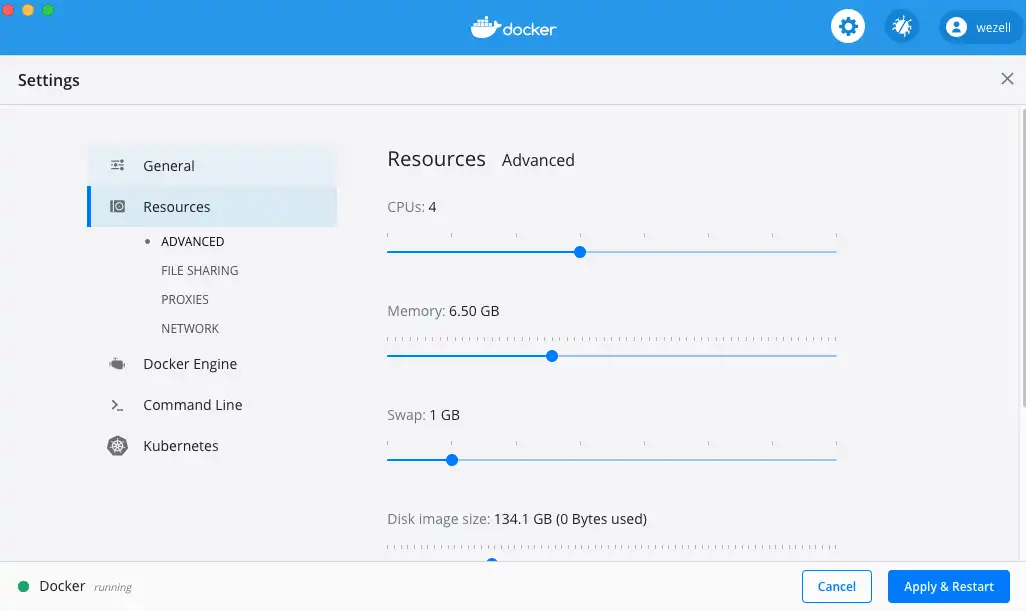
If you are running docker desktop on Windows or MacOS, make sure you have enough resources dedicated to docker before you proceed.
Start dotCMS
With Demo Content
Run the command below if you want to start dotCMS with demo content and data. The docker compose file that is run is downloaded directly from our github examples repo. It includes all the content/data from our demo site.
curl -o docker-compose.yml https://dotcms.com/run/demo && docker-compose up
Clean and Empty
If you want to start fresh, you can also start up a clean installation with no data. Again, this comes from our github examples repo.
curl -o docker-compose.yml https://dotcms.com/run/clean && docker-compose up
Login to dotCMS
Once your dotCMS is up and running, you can connect to it by going to https://local.dotcms.site:8443.
To sign in to the administrative console, go to
https://local.dotcms.site:8443/dotAdmin
and use the following credentials:
admin@dotcms.com / admin
(Note: You can also use https://localhost:8443; just accept any certificate warning.)

Running dotCMS on AWS
This example shows how to install dotCMS on Amazon's Linux 2 via docker. There are many ways to configure dotCMS in docker - for a list of options that can be applied to our docker images see our documentation site.
Start up a new Amazon Linux 2 (x86) AMI
Make sure your server has appropriate memory and disk space. We recommend a minimum of 7.5GB of memory and 50GB of disk space.
Memory Size:
-
Minimum Memory: 7.5GB or more.
Examples: Amazon m5.large, and t3.large instance types.
For more information on dotCMS memory usage, see the Memory Configuration documentation.
Disk Space:
-
Recommended Disk Space: 50GB or higher for a better testing/development experience.
Examples: Amazon m5 instance types with additional storage selected, or Amazon m5 or t3.
Security Zone:
Place the box in a Security Zone that allows for access to port 22, 80 and 443
Connect to the server using ssh
ssh -i ~/keys/your-key.pem ec2-user@{servers.amazon.public.ip}
Run the following recipe
Cut and paste these commands into your ssh terminal. These commands will download and install docker, set up a dotcms user and fire up an example dotCMS installation.
sudo yum update -y
sudo yum install docker git -y

## set elasticsearch virtual memory settings
## Elasticsearch will not start up without this
sudo sysctl -w vm.max_map_count=262144
sudo sysctl -w fs.file-max=100000

## make sure they stick
sudo sh -c "echo 'vm.max_map_count=262144' >> /etc/sysctl.conf"
sudo sh -c "echo 'fs.file-max=100000' >> /etc/sysctl.conf"
sudo sysctl -p

## edit docker file limits
sudo sh -c "echo \"OPTIONS='--default-ulimit nofile=65536:65536'\" >> /etc/sysconfig/docker"

## Start docker
sudo service docker start

## install docker-compose
sudo curl -L "https://github.com/docker/compose/releases/download/1.24.0/docker-compose-$(uname -s)-$(uname -m)" -o /usr/local/bin/docker-compose

## set exec perms
sudo chmod +x /usr/local/bin/docker-compose

## Symlink it to your path
sudo ln -s /usr/local/bin/docker-compose /usr/bin/docker-compose

## test that it works
docker-compose --version

## dotCMS docker image runs with uid 1000000000
sudo useradd -u 1000000000 -U -G docker  -d /data dotcms

## make data readable
sudo chmod -R 755 /data

## Change to dotcms user
sudo su dotcms -

## mk installation directory
mkdir /data/dotcms && cd /data/dotcms

## copy one of the example docker-compose templates
wget https://raw.githubusercontent.com/dotCMS/core/master/docker/docker-compose-examples/single-node-demo-site/docker-compose.yml

## fire it up!
docker-compose up -d && docker-compose logs -f

Building dotCMS from Source
It is easy to roll your own custom dotCMS build. Our open source code is on GitHub and can be downloaded, modified and reused as needed.
Clone the dotCMS Git Repository
Run the following command to clone the repository.
git clone https://github.com/dotCMS/core.git
Compile dotCMS
Once you have cloned dotCMS, you can `git checkout` the branch you want to compile. In this case, we will compile the `master` branch. dotCMS uses Gradle as our build tool. You need to be in the `core/dotCMS` branch to use it. The gradle task `createDist` will download and package a complete dotCMS distribution.
cd core
git checkout master
cd dotCMS
./gradlew createDist
After gradle is done, you will find your newly built dotCMS distros (both tar and .zip) under the `/core/dist` folder. This is the complete dotCMS package, including a Tomcat app server needed to run dotCMS.
Run
At this point, the newly minted dotCMS build can be deployed just like our distribution. For instructions on how to do this, see:
https://dotcms.com/docs/latest/installing-from-release
for detailed instructions on how to install and configure dotCMS.